OCR · Evaluation · 30 September 2026
How to choose an OCR engine for your documents
We ran five open-source OCR engines on 25 kinds of difficult page. None was best at everything, all of them made the same mistake on look-alike codes, and one cheap preprocessing step took a table from 18% to 100%. Here is what we measured, and how to run the same test on your own pages.
Most teams choose an OCR engine from a demo, a leaderboard, or whatever their cloud provider offers. Then the real documents arrive: a crooked scan, a phone photo of a form, a table of figures saved as a low-quality JPEG. The engine that looked perfect in the demo now misreads an amount, drops a line, or confidently returns text that is not on the page. Usually nobody notices until the number is already in a database.
What we tested
We drew 25 pages from text we wrote ourselves, so the correct answer is known to the character. Each page reproduces one way documents arrive in real life. The letters, forms and tables are fictional: a harbour authority's tariff letter, a vessel arrival form, a statement of operations.
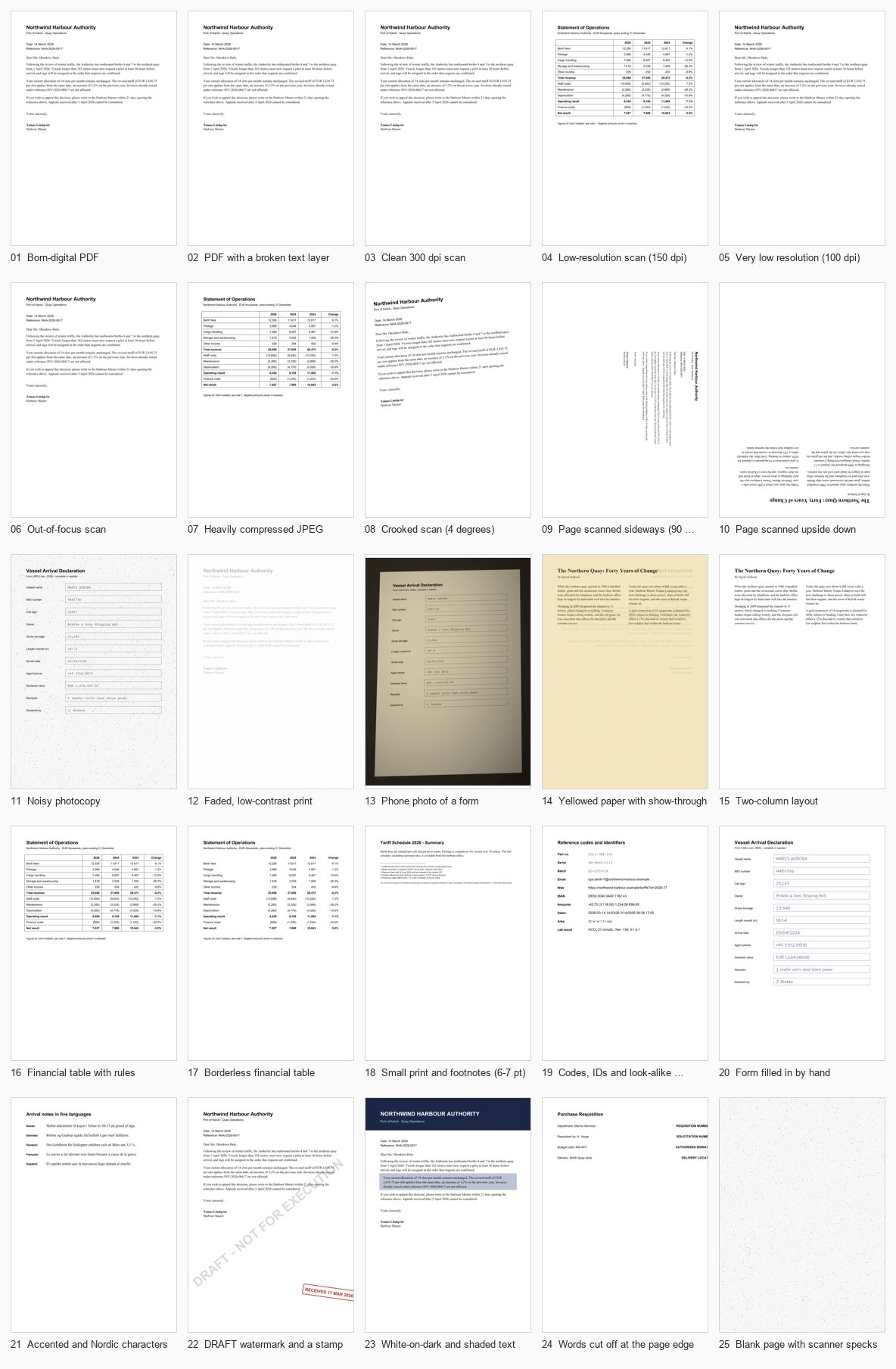
- Text layer: a born-digital PDF, and a PDF whose hidden text layer is garbled
- Scan quality: clean 300 dpi, 150 dpi, 100 dpi, out of focus, heavy JPEG, noisy photocopy, faded print, phone photo, yellowed paper with show-through
- Geometry: crooked by 4 degrees, sideways, upside down
- Layout: two columns, a ruled financial table, the same table without rules
- Content: 6–7 pt footnotes, look-alike codes, a form filled in by hand, five European languages, a DRAFT watermark, white-on-dark text, words cut off at the page edge, a blank page with specks
The engines are all free and ran on one laptop, CPU only: Tesseract 5, RapidOCR (PaddleOCR's models on ONNX Runtime), PaddleOCR 3 and Docling from IBM, plus the PDF's own text layer where one exists. Tesseract and RapidOCR also ran a second time with automatic preprocessing (rotate, deskew, upscale, flatten the background, remove table rules), shown as + prep.
How we scored
Every word of the correct text lands in exactly one bucket, and every extra word the engine produces is counted too.
We also track key values separately: the amounts, dates, reference numbers and names that a business process depends on. A page can be 98% right and still wrong in the one number that matters, so key values are what we rank by.
The results
| Engine | Key values right | Words right | Misread | Missing | Invented | Seconds / page |
|---|---|---|---|---|---|---|
| PDF text layer (2 of 25 pages) | 50.0% | 50.3% | 0.7% | 49.0% | 47.9% | 0.00 |
| Tesseract | 70.4% | 88.3% | 3.4% | 8.3% | 4.7% | 0.95 |
| Tesseract + prep | 92.6% | 97.7% | 1.7% | 0.7% | 0.7% | 0.81 |
| RapidOCR | 96.2% | 97.9% | 1.1% | 1.0% | 1.6% | 2.37 |
| RapidOCR + prep | 96.2% | 98.1% | 0.8% | 1.1% | 3.2% | 2.31 |
| PaddleOCR | 94.8% | 93.2% | 1.8% | 4.9% | 1.2% | 65.95 |
| Docling | 95.3% | 94.9% | 1.4% | 3.6% | 2.6% | 20.04 |
All 25 pages. Misread, missing and invented are shares of the words on the page. The PDF text layer only applies to the 2 pages that have one: it is perfect on one and useless on the other. Times are per page on a laptop CPU, after models are loaded.
On the averages, RapidOCR gets the most key values right (96.2%) at 2.3 seconds a page. Plain Tesseract comes last (70.4%), but with preprocessing it rises to 92.6% and is still the fastest engine at 0.8 seconds. PaddleOCR and Docling are close on accuracy but much slower on a CPU: 66 and 20 seconds a page. The averages hide the most useful part, though. Here is every page:
| Scenario | PDF text layer | Tesseract | Tesseract + prep | RapidOCR | RapidOCR + prep | PaddleOCR | Docling |
|---|---|---|---|---|---|---|---|
| Born-digital PDF | 100% | 100% | 100% | 100% | 100% | 100% | 92% |
| PDF with a broken text layer | 0% | 100% | 100% | 100% | 100% | 100% | 92% |
| Clean 300 dpi scan | n/a | 100% | 100% | 100% | 100% | 100% | 92% |
| Low-resolution scan (150 dpi) | n/a | 94% | 100% | 100% | 100% | 100% | 100% |
| Very low resolution (100 dpi) | n/a | 92% | 92% | 100% | 100% | 92% | 92% |
| Out-of-focus scan | n/a | 92% | 92% | 100% | 100% | 100% | 100% |
| Heavily compressed JPEG | n/a | 22% | 100% | 100% | 100% | 100% | 96% |
| Crooked scan (4 degrees) | n/a | 100% | 100% | 100% | 100% | 100% | 100% |
| Page scanned sideways (90 degrees) | n/a | 100% | 100% | 85% | 100% | 100% | 100% |
| Page scanned upside down | n/a | 0% | 100% | 78% | 100% | 0% | 78% |
| Noisy photocopy | n/a | 55% | 55% | 73% | 73% | 73% | 73% |
| Faded, low-contrast print | n/a | 100% | 100% | 100% | 77% | 100% | 100% |
| Phone photo of a form | n/a | 82% | 100% | 100% | 91% | 100% | 100% |
| Yellowed paper with show-through | n/a | 100% | 100% | 100% | 89% | 67% | 100% |
| Two-column layout | n/a | 100% | 100% | 100% | 100% | 100% | 89% |
| Financial table with rules | n/a | 18% | 100% | 100% | 100% | 100% | 100% |
| Borderless financial table | n/a | 100% | 100% | 100% | 100% | 100% | 98% |
| Small print and footnotes (6-7 pt) | n/a | 100% | 100% | 100% | 100% | 100% | 100% |
| Codes, IDs and look-alike characters | n/a | 70% | 70% | 65% | 65% | 85% | 85% |
| Form filled in by hand | n/a | 0% | 55% | 82% | 91% | 82% | 91% |
| Accented and Nordic characters | n/a | 20% | 20% | 100% | 100% | 100% | 100% |
| DRAFT watermark and a stamp | n/a | 81% | 81% | 94% | 94% | 88% | 81% |
| White-on-dark and shaded text | n/a | 100% | 100% | 100% | 100% | 100% | 93% |
| Words cut off at the page edge | n/a | 100% | 100% | 100% | 100% | 100% | 100% |
| Blank page with scanner specks | n/a | 3 invented | clean | clean | clean | 6 invented | clean |
What we learned
1. Don't OCR a page that already contains its text
A PDF exported from Word or InDesign already holds its text. Reading it took 0.005 seconds and was 100% correct. OCR on the same page took between 0.8 and 66 seconds and could only add errors. The text layer can also lie, though. Our second PDF looks identical on screen, yet its hidden text is garbage, as happens with a broken font encoding or a failed old OCR pass. Trusting it scores 0.7%. A quick check of whether the text looks like words catches it. So the first step of any pipeline is triage, not OCR.
2. A cheap fix beat a bigger model on tables
Plain Tesseract got 18% of the figures right on our ruled financial table, and 22% on the JPEG copy of it. The same table without ruling lines scored 100%. The rules break Tesseract's line finding, and it returns fragments like Totareveue—SSS. Painting long straight lines white before OCR, a few lines of OpenCV, took it to 100% on both. The heavier engines coped with rules on their own, but at 3 to 80 times the time per page.
3. Preprocessing has to be decided per page
The same preprocessing that fixed tables made other pages worse. Contrast stretching cost RapidOCR 23 points of key values on the faded page, and despeckling cost Tesseract on the photocopy. Upscaling the 150 dpi table on its own made Tesseract worse, until the rules were removed too. Fixes should follow from what triage finds on each page, not be applied to everything.
4. Every engine read the look-alike codes the same wrong way
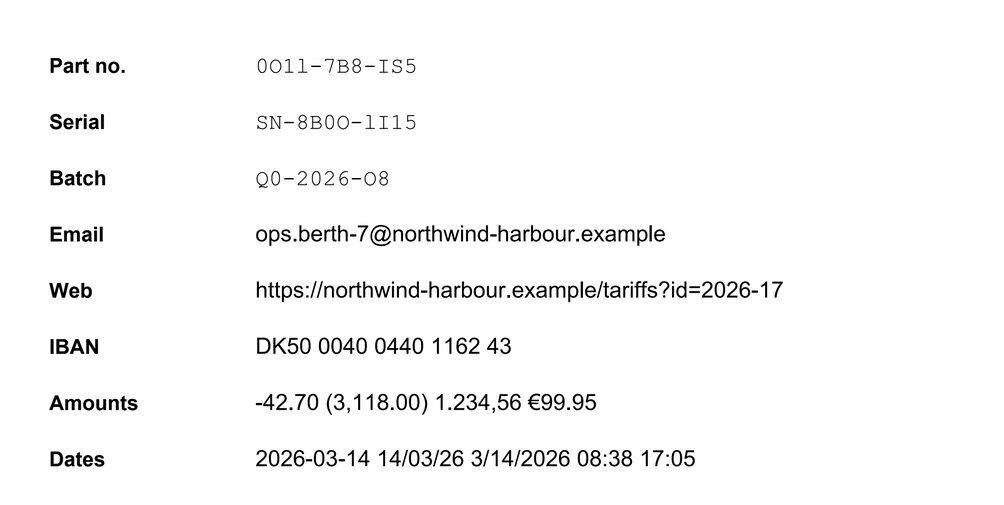
All six configurations turned 0O1l-7B8-IS5 into 0011-7B8-IS5, and Q0-2026-O8 into Q0-2026-08. Tesseract also dropped the subscript in HCO3 and the × sign. No engine fixes this on its own, because in many fonts those characters really are ambiguous. The fix sits outside OCR: validate codes against their format (check digits, known prefixes, a lookup in your own records) and send failures to a person.
5. Noise turns into digits
On the noisy photocopy, no engine got more than 73% of key values. The worst errors are the plausible ones. Tesseract read a gross tonnage of 23,540 as 123,540, because a speck became a 1, and a length of 187.4 as 167.4. Both pass any "is this a number?" check. Only a business rule, such as a cross-check against another field, or a person would catch them.
6. Handwriting and accents split the field
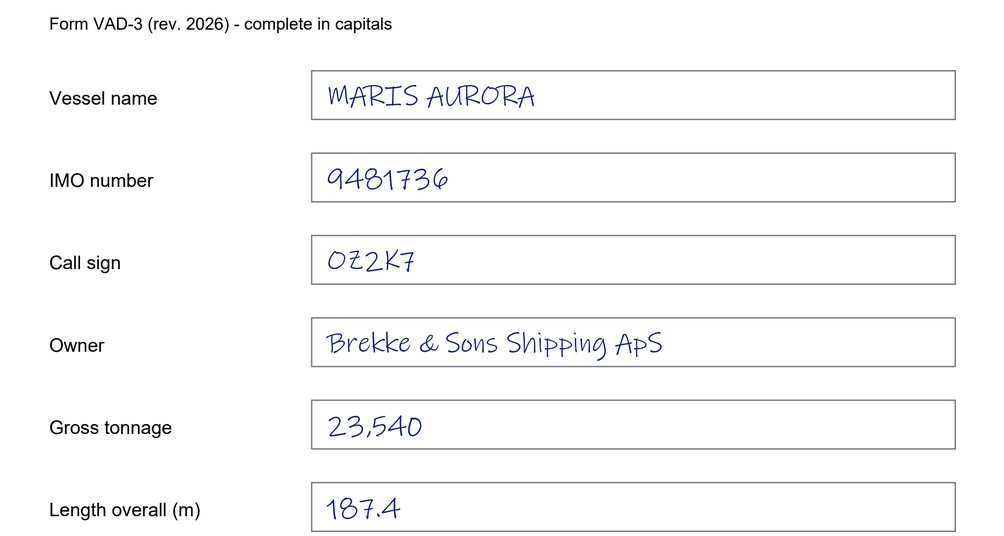
On the handwritten form, plain Tesseract got none of the answers exactly right: it read MARIS AURORA as SMARTS AURORA and 23,540 as 23500. RapidOCR and Docling got 82 to 91%, with errors like 03/04/2026 read as 03104/2026. On the five-language page, Tesseract with its default English model turned Þórður into bordur and Gebühren into Gebthren, getting 20% of the key words. The other three engines got every accented word right. Tesseract does better with the right language packs installed, and that is exactly the kind of detail a demo never shows.
7. Engines miss what the document is, not just what it says
Our watermarked letter carries a large diagonal "DRAFT – NOT FOR EXECUTION". Tesseract, PaddleOCR and Docling returned the letter and left the watermark out entirely. RapidOCR caught the word DRAFT but not the rest. For a contract or a claim, that watermark decides whether the document can be acted on at all. If document status matters in your process, check for it separately.
8. Some engines find text on blank pages
On a blank separator page with scanner dust, Tesseract returned 3 words and PaddleOCR 6. Triage recognised the blank page and skipped it, which is why the + prep version got it right. One result was reassuring: on words cut off at the page edge (REQUISITION NUMBE), none of these engines "completed" the word. General-purpose AI models are more tempted to, which is why the test is there.
9. Speed is a design decision
At 0.8 seconds a page, Tesseract with preprocessing gets through 10,000 pages in about two and a quarter hours on one laptop. PaddleOCR with default settings on the same CPU would need about a week. A GPU and tuned settings change that a lot, but the point stands: the engine you choose sets your hardware bill, and the cheapest setup sends each page to the lightest engine that handles it.
The pattern behind all of this: there is no single best OCR engine, only a best route for each kind of page. Read the text layer when it is good, skip blank pages, fix the pages that need fixing, send easy pages to a fast engine and hard ones to a stronger engine or a person, and check the values that matter against rules.
Run the same test on your documents
Our pages are synthetic on purpose, so every error can be traced to its cause. They show how engines fail. Only your own pages show how often. The tool we built for this post, ocr-bakeoff, runs on your own computer. Nothing is uploaded unless you add a cloud engine yourself.
| You have | You give it | You get |
|---|---|---|
| Scans, and the correct text for some of them | The scans, plus a .txt file with the correct text for each of 20 to 50 pages | Accuracy per engine and per page, key values, every error, speed |
| Born-digital PDFs | The PDFs. Their own text becomes the answer key, and the tool OCRs damaged copies: office scan, fax, phone photo, crooked, faded | How each engine would cope if these documents arrived as scans |
| Scans only, no correct text | The scans | Triage for every page, and how far the engines agree with each other |
pip install -r requirements.txt
python -m ocrbakeoff demo --open           # the 25 pages from this post
python -m ocrbakeoff serve                 # the same, from a web page
python -m ocrbakeoff run my-scans/ --truth my-truth/ --open
The output is one HTML report plus results.json, results.csv and every engine's raw text, so you can check any number yourself.
We are preparing the code for public release. Until then, email us and we will send it to you.
Limits of this test
- One page per scenario. It shows how each engine fails, not how often. Your own sample tells you that.
- The handwriting is a handwriting-style font, which is easier than real handwriting.
- We used default settings. Every engine can be tuned, and tuning is part of choosing one.
- Timings are for one laptop CPU. Compare engines within this run, not against other benchmarks.
- This measures words and values, not table structure (which cell a number belongs to). That needs a different check, which we will cover in a later post.
- We did not include commercial cloud engines or large vision-language models. The tool supports them, and we will add them in a follow-up.
Have this problem at volume?
Send us 20 of your pages. We'll tell you which engine fits, and what it would cost.
We run the bake-off on a sample of your documents, label the correct text, and send back the report: which engine or route fits your pages, what it gets wrong, where a person still needs to look, and the cost per 1,000 pages. Your files stay on our own server and are deleted afterwards.
hk24@kiliyo.com
Email us